 Krita VCS
Version control for your art, not your code.
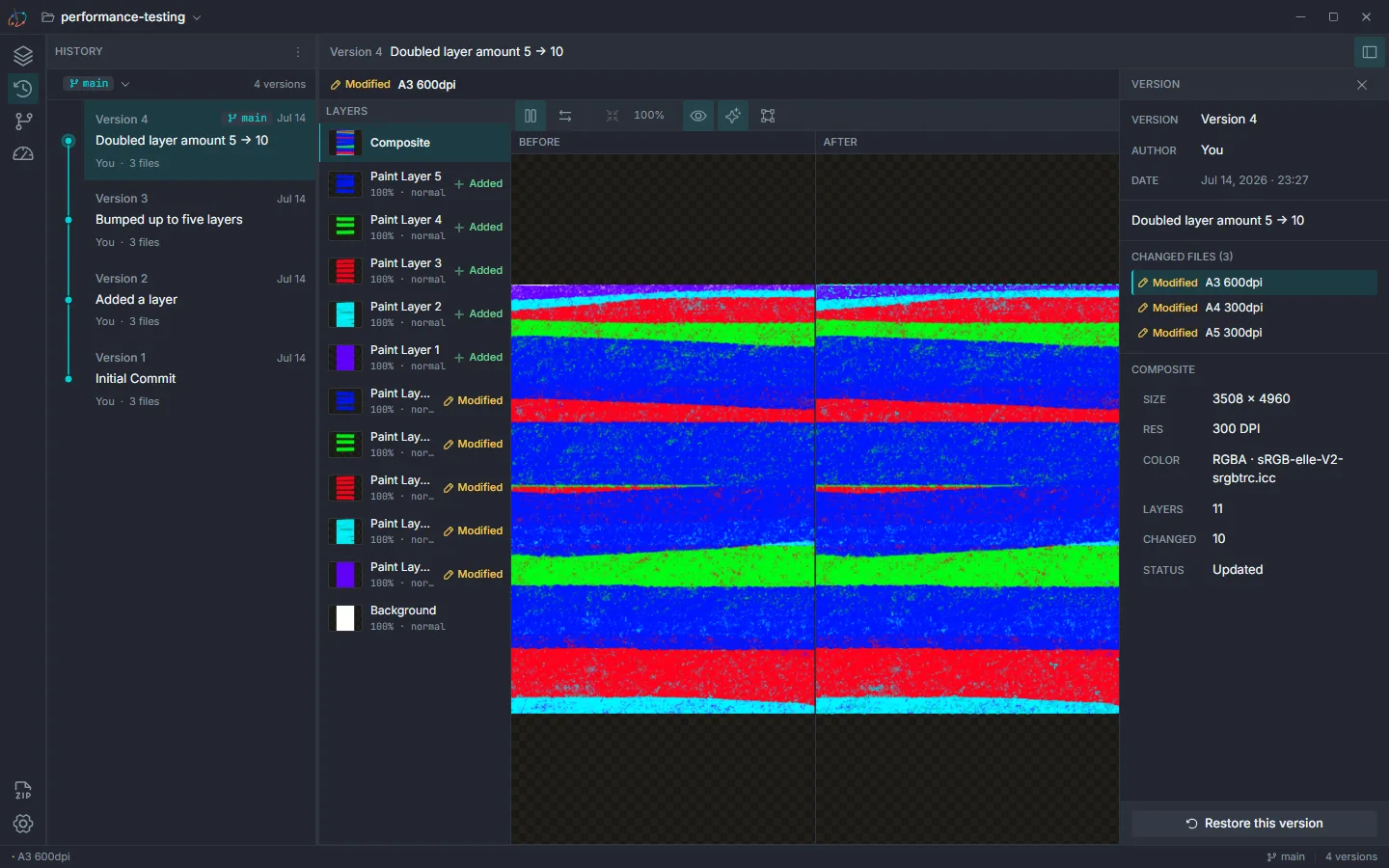
A free, local-only version control app for Krita painters and digital art. No cloud, no accounts, and none of the git jargon.
Made for painters, not programmers.
Version control has always been built for code. Krita VCS is built for paintings, and for the way you actually work.
Nothing ever leaves your computer.
All history lives in a hidden folder inside your own project. No account, no sync, no server. Ever.
It reads your painting, not just your file.
Krita VCS understands .kra files down to the tile, so a single brush stroke only stores what actually changed, not a fresh copy every time you save.
See what changed, visually.
No line numbers, no diffs full of symbols. Just your layers, before and after, side by side or on a swipe slider.
Explore without fear.
Try a new color direction or a redesign on a branch, switch back to your original whenever you like, and bring the two together when you're ready.
Built for real paintings.
Tuned to stay fast on large, layer-heavy files, so saves, comparisons, and restores don't crawl on anything but toy test cases.
See exactly what changed, layer by layer.
Compare any two versions side by side, or drag a swipe slider across the canvas, zoomed and panned in sync. Composites load first so you're never staring at a blank panel, with layers streaming in right after. Changed pixels show up as a dashed outline, layer by layer. Click a layer for its type, visibility, opacity, and blend mode, or the canvas for its size, resolution, and color space.
Color palettes get the same treatment: a swatch-by-swatch comparison with hex values, across every common format, so a palette tweak is as easy to review as a repaint.
Every save is a place you can go back to.
Each save is a full version you can return to anytime, and you choose exactly which files it includes, or save everything at once. Branch off to try something risky, then merge back when you're happy. Overlapping edits are flagged for review, never quietly overwritten; if one branch edited a file and the other deleted it, the edit wins. A color-coded graph shows how your branches connect.
Undo a save, or jump back several versions at once; old versions stay recoverable until you decide otherwise. Not ready to commit? Set the change aside on a shelf instead, and bring it back whenever you like. Unsaved changes can be discarded any time, always with a confirmation first.
Yours, in plain language, on your machine.
Artist Mode turns off the technical talk entirely: commit hashes become "Version 12," and changes become plain words like "Updated." One toggle switches back to the technical view.
History can grow over time, so one button shows how much space old versions are using and clears it, only when you say so. Nothing syncs, nothing uploads.
Removing a project moves its folder to your Recycle Bin instead of deleting it outright, so an accidental removal is just a restore away. Back up any project, or every project at once, to a single zip file, ready for an external drive or your own cloud storage. It's the one safety net Krita VCS can't provide automatically: if the project folder is ever lost outside the app entirely, a backup you made yourself is the way back.
Artist Mode reads version control in plain language:
Sign your work, tune it to your machine.
Put your name on every version you save, so on a shared project it's obvious who did what. Set once in Settings, alongside how much space preview thumbnails use.
Heavy revision history? Turn on compact storage and Krita VCS shrinks it down. Working with big files? Low-memory diffs load layers one at a time instead of all together, so RAM stays under control. Everything here is optional, and the custom title bar can be toggled off anytime, no restart needed.
Krita VCS ships with eight color themes, six dark and two light. Pick one in Settings and it applies right away, no restart, saved right there on your machine.
Preview budget
Compact storage
Themes
See exactly what version control is saving you.
A Performance tab shows what each version added next to what a full copy would have cost, with a percent-saved badge: already around 50% smaller than a full copy by your second save. Save and compare times sit right next to it too, no stopwatch required.
Save a version without leaving Krita.
An optional Version Control panel lives right inside Krita, beside your canvas: save a version, choose exactly which files go into it, discard a change you regret, set work aside, or switch between your version lines.
Click into the panel and it saves your open paintings for you first, so a version never misses your last few minutes of work. It runs on the same engine and the same history as the main app, so it never matters which one you used last.
Get the Krita pluginWhat I'm building next.
Krita VCS is still a work in progress. A few things I'm still improving:
Diff stashing
Set aside an in-progress comparison and come back to it later without losing your place, so you can hop between reviews without re-picking the same two versions.
A guided first-launch tour
A quick walkthrough of the app on first open, pointing out the repository switcher, Changes, History, and Settings so new users aren't left guessing.
Signed installers
Windows and macOS both flag the app as from an unknown developer on first launch, since it isn't code-signed yet. Getting a signing certificate is next, so that warning goes away.
Questions, answered.
What does it do?
It keeps every version of your painting as you save, like a save file for each stage of your art. You can look back at any earlier version, compare two side by side, or go back to one if you change your mind, all without leaving a mess of duplicate files on your computer.
What does KVC stand for?
KVC is just short for Krita VCS. You might also see it written as Krita VC, KritaVC, Krita-VC, or spelled out as Krita Version Control: different ways of writing the name of the same free, local-only app for Krita painters.
Is Krita VC the same as Krita VCS?
Yes, they're the same app. Krita VC is also what Krita's own Python Plugin Manager calls the optional in-Krita panel, but it runs on the exact same engine and history as Krita VCS, not a separate product.
Do I need to know Git, or use a command line?
No. There's no terminal and no git jargon anywhere in the app. Artist Mode (on by default) shows plain labels like "Version 12" instead of hashes and codes, so if you're comfortable saving a file in Krita, you already know most of what you need.
What's the difference between saving in Krita and saving a version here?
Hitting Ctrl+S in Krita still works exactly like it always has; that part never changes. Committing a version in Krita VCS is a separate step on top: it takes a snapshot of your saved file so you can come back to it, compare it, or go back to it later. Saving isn't the same as committing, so it's worth checking in a version once you've saved something worth keeping.
Is my art uploaded anywhere?
No. Krita VCS is local-only by design: there's no server, no account, and no sync. Every version lives in a folder on your own machine.
Do I need an internet connection to use it?
No. Everything runs and is stored entirely on your machine, so it works exactly the same with wifi on or off.
Can I lose work by using this?
It's built to make that harder, not easier. History is never deleted behind your back, actions that would discard something (like Discard) always ask you to confirm first, and version control runs as an extra safety net alongside your normal saving, not a replacement for it. Removing a project moves it to your Recycle Bin rather than deleting it outright, and you can back up any project to a zip file for extra safety, kept wherever you like.
Is it free?
Yes, Krita VCS is free and open source under the MIT license.
What platforms does it support?
It's a desktop app built with Tauri, available today for Windows, macOS, and Linux, on the same cross-platform base.
Will it slow down Krita or make my computer laggy?
It's tuned for large, layer-heavy .kra files, so saving, comparing, and restoring stay fast even on big, real paintings, not just small test files.
Does it work with any file, or just .kra?
It tracks the file types it understands and leaves the rest of your folder alone: Krita paintings (.kra), with the deep layer-by-layer visual diff, and color palettes (.gpl, .kpl, .aco, .ase), with a color-by-color swatch diff. Other files sitting in the project folder aren't touched, and Krita's own backup and autosave files are skipped too, so history stays a record of your work, not your app's scratch files.
Can I start using it on a painting I've already been working on for a while?
Yes. Point Krita VCS at the folder your painting already lives in and it picks up from there. You don't need to start a fresh file or lose any of your existing work to begin tracking it.
Do I have to use branches?
No. Branches are entirely optional. You can use Krita VCS just to save and compare versions on a single line of work and never touch branching at all.
Can more than one person work on the same painting with this?
Not currently. Krita VCS is built for one artist working locally, with no accounts and no shared or remote history. Branches let you explore multiple directions yourself, but there's no built-in way to share history between different people or machines.
Will my history get huge over time?
It only stores what changed between saves, not a full copy each time, so history stays compact. And if you ever want the space back from old, unreachable versions, the built-in "Clean up storage" tool does it, with your confirmation.
What happens to my history if I uninstall Krita VCS?
Nothing. Your painting and its saved history live in a folder inside your own project, not inside the app. Uninstalling only removes the program; your files and their history stay exactly where they are.